The Complete Guide to IT Communities: Types, How to Join, and How to Choose (2026 Edition)
Key points (30 seconds)
- Conclusion: An IT community is an openly accessible, volunteer-operated setting—usually free to join—where people exchange knowledge beyond organizational boundaries in fields such as software, infrastructure, data, and AI
- Why it matters in 2026: Technology changes quickly, referral hiring has grown, and established remote work has reduced learning inside companies
- Four benefits: practical information on current developments; advisers outside your organization; evidence through speaking and OSS work; and career-change, side-work, hiring, or collaboration opportunities
- This guide comes from the operator of Kyoto's Miyako de IT, with 7 years, 165 events, and 615 members
Chapter 1: What is an IT community?
1-1. Definition
“IT community” is an umbrella term for a setting where people exchange knowledge across organizational boundaries around a shared technical field such as software, infrastructure, data, or AI. Unlike a commercial membership group or paid school, it is generally free to join, volunteer-operated, and openly accessible.
The terms IT engineer community, technology community, and developer community are also used; this article calls them all IT communities.
1-2. Why it is needed in 2026
Technical change has become too fast to follow through self-study alone. In generative AI, AI agents, distributed systems, and Web3, official documentation may change before a book reaches publication. Communities share first-hand information from members' work in real time.
Hiring has also changed. Referral and direct recruiting have grown, and speaking, OSS contributions, and technical articles become career assets. Continued community participation is one of the least expensive ways to build that record.
As remote-first work has become established, the accidental learning once produced by workplace conversation occurs less often. Community co-working sessions and social gatherings are being reassessed as places that restore those opportunities.
1-3. Four benefits of participating
First, you hear current technology developments from a practical perspective, including specific failures and ways to avoid them that books and articles may omit.
Second, you gain technical advisers outside your employer, reducing time spent stuck alone and improving learning efficiency.
Third, you gain opportunities to build objective evidence through talks, articles, and OSS activity.
Fourth, relationships can grow into career changes, side work, joint projects, and hiring opportunities.
---
Chapter 2: Types of IT engineer communities
Understanding the types makes it easier to choose a place suited to your purpose. Here are ten types organized by participation format, specialization, and scale.
| Type | Entry barrier | Typical frequency | Main benefits |
|---|---|---|---|
| Co-working study session | Low | Weekly to monthly | Focused work time and light peer connections |
| Study group or lightning-talk event | Low to medium | Monthly | Knowledge, speaking experience, and feedback |
| Networking or social event | Low | Irregular | Networks and chance encounters |
| Hackathon | Medium to high | Irregular | Development experience, team production, and a deliverable |
| Conference | Medium | Several times a year | Current developments and broad knowledge |
| OSS community | Medium to high | Year-round, asynchronous | Implementation ability and an international record |
| User group | Low to medium | Monthly to quarterly | Deep knowledge of a specific product or service |
| Specialist community | Medium | Monthly to quarterly | Deep expertise and front-line knowledge |
| Regional community | Low | Monthly | Local networks and durable relationships |
| Internal or cross-company community | Medium | Irregular | Work-relevant knowledge and outside contacts |
*Barriers and frequencies are general guides. Confirm each event's current details on its registration page.*
2-1. Co-working study sessions
Participants bring their own tasks and work quietly in the same space. A common format gives each person one minute at the beginning and end to share what they plan to do and what they completed. There is no presentation obligation, making this the lowest barrier. It suits people who need protected study time or cannot focus at home, and provides someone to ask when they get stuck.
2-2. Study groups and lightning-talk events
Several speakers present on a theme while participants learn. These often include lightning talks—short talks of about five minutes—which suit a first speaking attempt. Listening-only participation is usually welcome. You can efficiently absorb current developments and field knowledge; recurring attendance often creates a natural opportunity to become a speaker.
2-3. Networking and social events
These emphasize participant conversation more than technical sessions, including conference receptions and monthly regional-community gatherings. Speaking with strangers has a psychological cost, but these events often initiate career moves, paid work, or joint projects. They also show whether someone seems worth talking with, separately from technical skill.
2-4. Hackathons
Teams build a product around a theme in several hours or days. Formats include civic hacks for social problems, company-sponsored problem solving, student events, and local-government partnerships. They require some implementation skill, but offer team-development experience, practice producing a deliverable quickly, networking, and sometimes prizes or hiring opportunities.
2-5. Conferences
These are large annual events with hundreds or thousands of attendees and several parallel tracks. Listening has a low barrier and provides a one-day overview of an industry's direction. An accepted proposal leaves a visible record as a speaker, and the format can create contact with overseas speakers.
2-6. OSS communities
Members jointly handle issues, review pull requests, improve documentation, and maintain open-source software. The barrier depends on code-reading ability, but people willing to communicate in English can work across borders. A public commit history is objective evidence and can support evaluation in the job market.
2-7. User groups
These form around a language, framework, cloud, database, or other stack. They offer depth and high-quality information from active practitioners. Continued participation naturally places you within that field's professional network.
2-8. Specialist communities
These focus on fields such as AI, data science, security, Web3, embedded systems, or robotics. Entry barriers vary, but they can provide rare expertise and contact with leading people. Some are closed, credential-restricted, or invitation-only.
2-9. Regional communities
These are rooted in a municipality or prefecture and serve as hubs for IT talent in cities such as Kyoto, Fukuoka, Sapporo, Nagoya, and Okinawa. They offer accessible local participation, long-term relationships, contact with local companies, and U-turn or I-turn relocation information. Their cross-stack membership also broadens adjacent knowledge.
2-10. Internal and cross-company communities
These are operated within one company or through collaboration among companies, often for developing new IT engineers, aligning technology stacks, or employer branding. Many remain private, but more now open some activity externally. The branding and recruiting value gives companies a clear benefit.
---
Chapter 3: Choosing a community—seven checks
Check 1: Activity frequency
Frequency ranges from weekly sessions and monthly meetings to annual conferences. Choose monthly or twice-monthly recurring events for a stable learning rhythm, or annual conferences if updates are your only purpose. Excessive frequency can turn guilt about absence into stress.
Check 2: Entry barrier
Look for “listening only is welcome,” “beginners welcome,” and a reasonably varied participant history. Beginners can choose a place with a record of welcoming learners; experienced engineers may learn more in a setting with denser discussion.
Check 3: Region and format
Check whether events are online, in person, or hybrid. Online participation is convenient but relationships can deepen more slowly. In-person regional events allow repeated meetings with people in the same city and support long-term relationships.
Check 4: Specialization and theme
General and technology-specific communities provide different information. Beginning in a general community and moving into a specialist one after your work area becomes clear is efficient. Belonging to several in parallel is common.
Check 5: Continuity of operation
Review events over the past one or two years, the organizing team, and participant trends. A recurring setting has greater long-term relationship value than a one-off event. As a rough minimum, look for at least four events a year and three years of continuity.
Check 6: Free or paid
Participation is usually free, though social-event, venue, or conference costs may apply. Paid settings can attract committed participants but raise the first-visit barrier. Starting free and investing in paid settings after relationships develop is manageable.
Check 7: A Code of Conduct
Check whether harassment response, participant safety, photography, and recording are documented. A public Code of Conduct often signals mature operations and consideration for newcomers. Diversity in gender, age, and experience can be evaluated from the same perspective.
---
Chapter 4: Practical steps to participation
Step 1: Choose where to search
Five main routes are event-search platforms for IT study groups, technical-article platforms, hashtag searches on social media, announcements from local governments, universities, and coworking facilities, and word of mouth through internal or external Slack groups. Begin with one search platform and search by region or theme.
Step 2: Choose three events that interest you
Do not narrow the choice to one immediately. Pick three that differ in type, region, or specialization; comparison makes your preference visible.
Step 3: Read previous reports
Read event reports, participant social posts, and organizer blogs. Knowing the atmosphere, participants, and difficulty in advance lowers the day's psychological burden.
Step 4: Register and prepare
If registration asks for a profile, give one line each for affiliation, technologies of interest, and purpose. This helps organizers start a conversation. For in-person events, confirm the route, travel time, and required items—computer, business cards, power supply, and identification—by the previous day.
Step 5: On the day, say “This is my first time”
Tell reception or an organizer immediately. That simple statement makes introductions, guidance, and seating consideration more likely. Take notes during sessions; at the social gathering, start with something you found interesting in a presentation.
Step 6: Publish something the next day
Within 24 hours, briefly share what you learned on social media or a personal blog. It need not be long. Organizers or speakers often find and respond to it, turning one visit into a continuing relationship.
---
Chapter 5: Kyoto's regional context
5-1. Kyoto's IT-community environment
Kyoto combines a concentration of universities with traditional and advanced industries. Participants include student engineers, researchers, people using IT in traditional crafts, and remote workers who relocated. Proximity to universities and research institutes creates academia–industry opportunities; Why Kyoto Needs IT Engineer Communities for Academia–Industry Collaboration explains the bridging role.
There are fewer events than in Tokyo, but relationships often last after people first meet. A smaller community makes each person visible.
5-2. Why events use temples and machiya
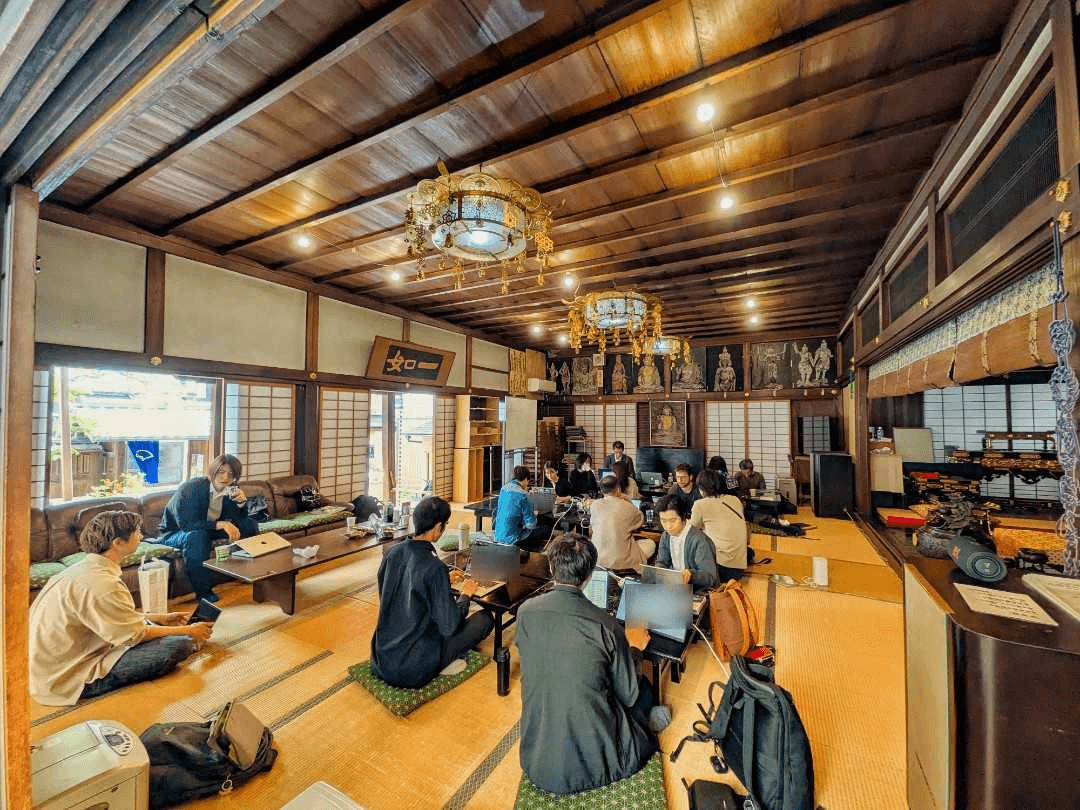
Temples, machiya townhouses, and old houses down narrow alleys are not merely theatrical venues. First, they help participants switch mental modes; discussion on tatami can become softer than in an office. Second, discussing technology in a living cultural setting naturally connects engineering with society and culture. Third, making Kyoto itself part of the purpose lets visitors combine attendance with travel and increases the population connected to the region.
5-3. Why regional communities support learning and careers
Their greatest strength is continuity built on the shared foundation of working in the same city. Different stacks matter less when people share a place. The community remains after a job change, allowing relationships to accumulate over five or ten years. In regional cities, recruiting and commercial relationships with local companies also grow naturally. If a large Tokyo community is broad and shallow, a regional one is narrow and deep.
---
Chapter 6: The position of Miyako de IT
6-1. 7 years, 165 events, and 615 members
Miyako de IT is a regional IT community based in Kyoto. Since its launch in 2019, it has held 165 events and brought together 615 members. It combines recurring co-working study sessions, monthly study groups, quarterly themed events, and an annual retrospective. Engineers, designers, executives, students, and local-government staff meet across technology stacks.
6-2. The TEMPLE model
Miyako de IT designed TEMPLE as its community-operations framework: Theme, Environment, Members, Persistence, Local, and Evolution. It treats a community not as a one-off event but as a temple-like setting that evolves over time. Companies launching internal communities and local governments growing regional ones can also apply it; Netsujo Inc. supports internal-community development using the model.
6-3. Why Kyoto
Kyoto is large enough for universities, companies, traditional culture, and visitors to intersect, but small enough for deep relationships. That density is fertile ground for community. Its cultural depth also allows temples and machiya to serve as venues, making Kyoto a rare base that embodies the connection between technology and place.
---
Frequently asked questions about participating in IT communities
Q. Can a programming beginner join?Yes. Many communities welcome beginners. Begin with a study group marked “listening only is welcome” or a co-working study session. Meeting working engineers is valuable even at the start of learning.
Q. How many visits before it feels like a place I belong?After about three consecutive visits, faces and names begin to match. Over six months to a year, organizers speak to you more often and you become a familiar participant. Post after visit one, speak briefly with an organizer on visit two, and learn another participant's name on visit three.
Q. What if I cannot attend events in a major city?Begin online or with a nearby regional community, then travel to a large conference only a few times a year. Around Kyoto, Miyako de IT serves as a regional hub.
---
Conclusion
An IT community is like another workplace for continued technical learning. Perspectives unavailable inside one employer, long-term career opportunities, and lifelong relationships grow there. Learn the types, apply selection criteria, read a report, and register for one event. After three visits, a community can become a place you belong.
Contact Miyako de IT or Netsujo Inc. if you seek a regional community in Kyoto, want to launch an internal community, or are advancing regional digital transformation at a local government or university.
Guide by purpose: what to read next
This article is the hub for the overall subject. Continue to a focused guide for your purpose.
Joining for the first time
- What Is a Co-working Study Session? — A practical guide to a low-barrier format
- A First-Timer's Complete Guide to IT Study Groups — What to bring, etiquette, and the day's flow
- An IT Community Guide for Students, Beginners, and First-timers — Removing anxiety around the first step
- The Real Value of an IT Engineer Community Begins with Three Visits — What changes when you continue
Understanding and choosing formats
- The Effects of Co-working Study Sessions — Focus, networks, and learning rhythm
- How to Design IT Study-group Formats — Choosing co-working, reading, lightning-talk, and hands-on formats
- Choosing Between connpass, Doorkeeper, and Meetup — Comparing search platforms
- A Complete Guide to Your First Lightning Talk — Moving from listener to speaker
Searching in Kyoto and Kansai
- How to Find Study Groups in Kyoto — Finding and choosing Kyoto events
- Kyoto IT Engineer Communities — The local community landscape
- Kansai IT Engineer Communities and Study Groups — Differences among Kyoto, Osaka, and Kobe
Building networks and careers
- Seven Ways IT Engineers Build Networks in Communities — Concrete relationship-building practices
- Remote IT Engineer Loneliness and Five Responses — Using in-person settings
- Five Reasons New IT Engineers Should Join Communities — Early-career use
- The Complete Guide to IT Engineers in Kyoto — Companies, salaries, and career changes
Operating or participating as a company or local government
- How to Start an IT Community in a Regional City — Six launch elements
- Five Steps for an Operating Company to Launch an Internal Community — Applying TEMPLE
- How Corporate Sponsorship Supports IT Communities — Sponsorship practice
- How Local Governments Can Work with IT Talent Communities — Regional examples from Kyoto
- Five Reasons Offline Communities Matter — The value of meeting in person
Related articles
Kansai IT Engineer Communities and Study Groups: Choosing Between Kyoto, Osaka, and Kobe (2026 Guide)
This guide is for people looking for IT engineer study groups and communities in Kansai—Kyoto, Osaka, and Kobe. Drawing on 7 years and 165 events of community operations in Kyoto, it explains each city's character, how to choose a city, how to participate across cities, and how to take the first step.
Kyoto Engineer Communities: A List and How to Choose
An objective, purpose-based guide to IT engineer communities active in Kyoto, covering five perspectives: learning, deepening specific technologies, academia–industry–government collaboration, students, and international exchange.
What Is a Co-working Study Session? How to Register and What Happens on the Day [2026]
A mokumoku-kai is an event where IT engineers gather in one space and quietly work on their own tasks. Joining takes only three steps: find one on connpass, press the registration button, and bring your laptop on the day. Beginners and solo participants are welcome; bring a laptop and charger, and expect a fee from free to ¥1,000. Drawing on 165 events, Kyoto IT community Miyako de IT explains registration, what to bring and wear, the day's flow, and common first-time concerns.
Source data
The figures cited in this article are based on primary data in the Miyako de IT annual statistics report. It publishes yearly event counts, venue distribution, and event-format data.
Written by
Miyako de IT