Your First IT Study Group: What to Bring, Etiquette, Choosing an Event, and the Day-of Flow (2026)

Introduction: everyone worries before attending
“Is my skill level high enough for an IT study group?” “Will I stand out if I go alone?” “What should I bring?”
If these questions worry you, rest assured: almost everyone attending an IT study group or co-working study session for the first time feels exactly the same way.
Miyako de IT runs a Kyoto-based IT-engineer community. We have held 165 events and now have 615 connpass members. At almost every event, someone tells us it is their first time.
This article organizes everything a first-time attendee needs, from formats and selection to belongings, etiquette, and answers to common concerns. By the end, you should feel ready to give one a try.
---
What is an IT study group? Know the formats
“IT study group” covers several formats. Start by understanding the main ones.
Co-working study session
Each participant brings something they want to do and works quietly. Programming study, personal development, and certification study are all welcome. With no compulsory presentation and freedom to work at your own pace, this is the lowest-barrier format for beginners. Being able to ask nearby participants when stuck is another major benefit.
LT event (lightning talks)
Several people give short presentations of about 3–5 minutes. Topics range from technical subjects such as personal projects to careers and recently tested tools. Listening-only attendance is usually welcome. The short talks also make speaking relatively approachable.
Hands-on workshop
Participants learn by doing under an instructor or facilitator. These often focus on a particular technology, such as trying Docker or building a simple React application. Working through the material makes it easier to understand deeply.
Reading group
A group chooses a technical book, assigns chapters, and presents and discusses them. A substantial book that is difficult to finish alone becomes manageable with others. Some groups assign reading beforehand; others read together on the day.
Conference
A large event lasting half a day to several days, with multiple sessions running in parallel and sometimes corporate sponsor booths. It is an efficient way to catch up on technical trends.
---
Five benefits of attending IT study groups
1. Practical skills difficult to gain alone
Experienced engineers can teach technology used in the field and professional best practices that books and online courses may not convey. You can ask questions immediately, sometimes resolving a problem that had blocked independent study.
2. Peers and a network with shared goals
Peers available for technical consultation matter greatly to an engineer's growth. People often continue exchanging information after meeting at a study group or begin a project together. Horizontal connections are especially valuable to freelancers and independent developers.
3. Sustained motivation to learn
Maintaining motivation alone is difficult. Regular attendance creates a target for the next meeting and sets a pace. Simply seeing other participants working hard can be motivating.
4. Broader career options
Engineers from many companies and occupations attend. You may hear candid information about employers or unexpectedly receive a work request or recruitment approach. You also gain a direct sense of which skills the market needs. To understand Kyoto employers in advance, see 20 Major IT Companies and Manufacturers in Kyoto.
5. Efficient awareness of current trends
IT trends change rapidly. Speakers and participants discuss current tools, frameworks, and development methods. First-hand impressions unavailable in official documentation are a distinctive benefit.
---
How to find a study group
Several established services help you find IT study groups.
connpass
connpass is one of Japan's leading search and registration platforms for IT-engineer study groups. Filter by technology, region, and date; follow a group to receive notice of new events. GitHub or X integration makes account creation simple, so it is a good first service to join.
TECH PLAY
TECH PLAY searches IT events, study groups, and seminars together. Search by tag or keyword and favorite topics to receive related events by email. Checking it alongside connpass reduces missed opportunities.
X (Twitter)
Search hashtags such as #mokumoku, #studygroup, and #LT to find current events. Following organizers and official community accounts brings announcements into your timeline, while participant comments help convey the atmosphere.
Referrals from colleagues and acquaintances
An easily overlooked method is asking a colleague or acquaintance about study groups. Someone with experience may go with you, substantially lowering the psychological barrier to a first visit.
---
How to choose a study group that suits you
Use these four criteria to choose among many events.
Topic or technical field
Begin with what you want to learn: Python, React, AWS, AI/machine learning, or another field. Some groups specialize, while co-working study sessions bring together many technologies. An unrestricted session is approachable for a first visit.
Attendance and scale
Small groups of about 5–15 make questions and conversation easier. Events of 50 or more provide more information but may feel uncomfortable to a beginner. A medium-sized first event of about 10–20 people offers a good balance.
Online or offline
Online events are easy to join from home and often permit listening with the camera off. Offline events make face-to-face conversation and deeper connections easier. Starting online and moving offline after learning the atmosphere is also reasonable.
Atmosphere and participants
connpass pages sometimes include reports and participant comments from earlier events. “Beginners welcome” or “first-time attendees welcome” is reassuring. Photos and reactions on the organizer's X account can also reveal the atmosphere.
---
Preparing to attend: checklist
Check what you need in advance.
Essential items
- Laptop: essential for co-working sessions and hands-on workshops, and useful for notes at lecture-style seminars
- Laptop charger and power cable: venues usually provide outlets, but forgetting the charger can end your work
Useful extras
- Business cards: useful at social gatherings; personal cards are fine, and having none is also fine
- Earphones: useful for concentration or a hybrid online session
- Mobile battery: reassuring during a long event
- Drinks and snacks: many venues permit them at longer events
Things to do beforehand
- Development setup: hands-on events may require specified software or libraries; check the event page so setup does not consume the learning time
- Prepare an introduction: be ready to say your name, what you normally do, and today's goal in about 30 seconds
- Check access: review the map and building entrance so an unfamiliar venue does not make you late
---
The day-of flow: a typical co-working study session
1. Reception (from 10 minutes before the start)
Give your name at reception. Often showing the connpass page or QR code is enough. Say it is your first visit and the organizer will guide you.
2. Opening and introductions (5–10 minutes)
The organizer explains the event and Wi-Fi, followed by brief introductions. Each person typically spends 30 seconds to one minute on their name, normal work or study, and today's task.
3. Quiet work (1.5–3 hours)
This is the main period. Focus on your task, ask nearby participants when needed, or work alone. You may leave your seat for a drink or break.
4. Results sharing (15–30 minutes)
Some events offer one or two minutes per person to share what they did. “I worked through the official tutorial” or “I resolved an error” is enough. Many events make this optional.
5. Social time (30 minutes to one hour)
An optional gathering may follow. Technical discussion, career questions, and casual conversation take place in a relaxed atmosphere, giving first-time attendees an opportunity to widen their network.
---
Etiquette and mindset
1. Attend after registering; cancel early if necessary
After registering through connpass, plan to attend. If you cannot, cancel as early as possible. A no-show affects seating and food preparation and prevents a waitlisted person from attending.
2. Do not disturb other participants
People are concentrating. Avoid loud conversations and long calls. Before asking a question, observe the person, or use a break.
3. Confirm before taking photos or posting
Ask the organizer whether photography and posting are allowed. Obtain consent from anyone visible in the image.
4. Avoid sales and solicitation
A study group is for learning and exchange. Aggressive service sales or recruitment are unwelcome. Work may arise naturally in conversation, but avoid a one-sided pitch.
---
Recommended formats for beginners
A co-working study session is the strongest recommendation for a first event.
Reason 1: no obligation to present
Unlike an LT event or guided workshop, you simply work on your own task and face no pressure to answer questions publicly.
Reason 2: no required skill level
Everyone works on something different, so skill differences do not matter. New programmers and engineers with more than ten years of experience work in the same room.
Reason 3: easy late arrival and early departure
Many sessions permit both. You can try only one hour, making them accessible despite time constraints.
After becoming comfortable, try listening at an LT event or joining a hands-on workshop.
---
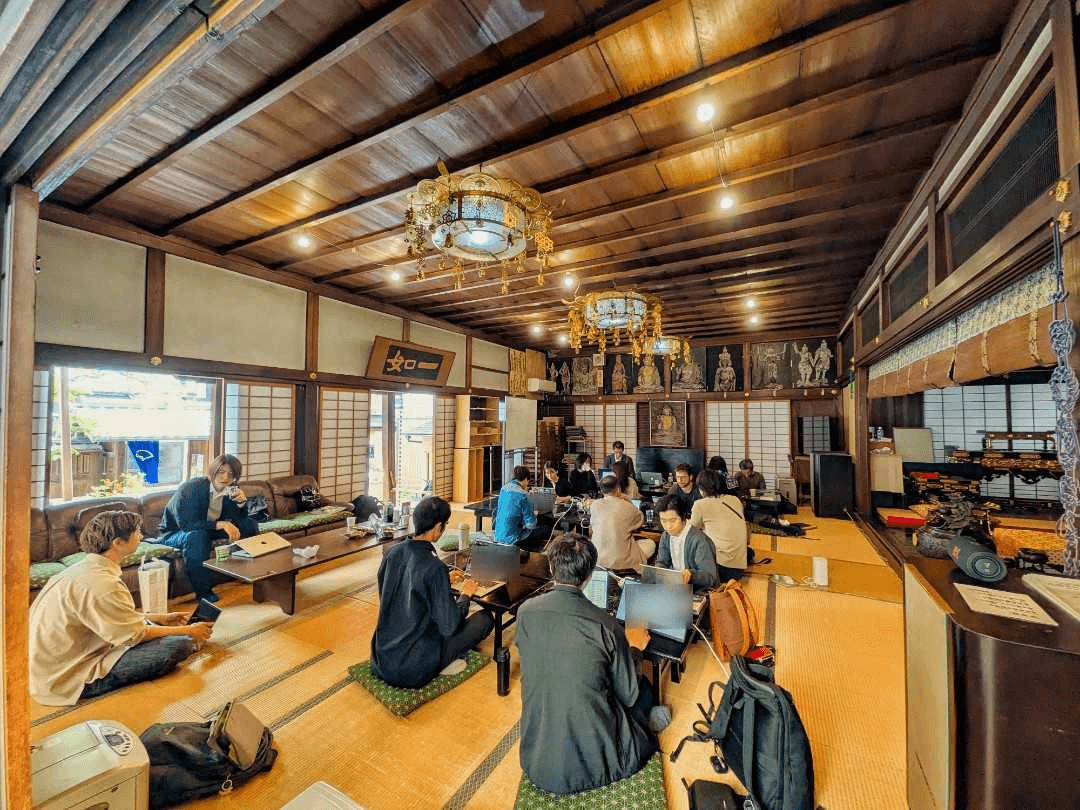
An example at Miyako de IT: a co-working study session at a Kyoto temple
Miyako de IT is a Kyoto-based IT-engineer community covering web applications, AI/machine learning, blockchain (Web3), and more. A distinctive feature is its Kyoto-style venues. Some sessions use a room at a temple, whose quiet, focused environment is popular.
A typical schedule is:
- 10:00 Reception opens; choose a seat
- 10:10 Brief welcome and Wi-Fi and power guidance
- 10:15 Thirty-second introductions: name and today's task
- 10:30 Quiet work begins
- 12:50 Optional one- to two-minute results sharing
- 12:55 Cleanup and departure; interested participants continue at a nearby café
Many participants are IT engineers in their twenties through forties, but students beginning programming and people changing from another industry are common. Organizers actively speak to first-time attendees, so coming alone is not a concern.
Search connpass for Miyako de IT to see upcoming events. People living near Kyoto or planning a visit are welcome.
---
Common concerns: Q&A
Q1. Can a programming beginner attend?
Absolutely. Participants often read introductory books or study with Progate or Dotinstall. Choose an event marked “beginners welcome” to meet people at a similar level. If you are deciding how to learn, see How to Learn Programming in Kyoto.Q2. Will I stand out if I attend alone?
No. Most people attend alone. That is precisely what creates new connections. Organizers understand this and use introductions and social time to help.Q3. What if I accomplish nothing?
That is fine. Reports such as “I only finished setting up the environment” or “I spent the whole time fighting an error” are routine. Sharing a blocker may bring advice. Perfect results are not expected.Q4. What should I wear?
Everyday clothes are fine. IT study groups have no dress code; T-shirts and jeans are common. Even large conferences rarely require business casual.Q5. Should I join the social gathering?
It is entirely optional. It can deepen connections, but attending only the main session first and joining later when comfortable is enough.Q6. How much does attendance cost?
Free to about ¥1,000 is typical. Many sessions are free or charge ¥500–¥1,000 to share venue costs. Large conferences may cost several thousand yen and often offer student discounts.Q7. Can I leave early?
Many events allow it. Co-working sessions commonly let people come and go freely. A guided hands-on workshop may be harder to leave, so check the event page.---
Conclusion: take the first step
In addition to building skills, IT study groups and co-working study sessions provide many positive effects on an IT engineer's career, including meeting peers and sustaining motivation.
Feeling nervous about attending for the first time is entirely normal. However, after actually visiting, most people say, “I didn't realize it would be this casual” or “I wish I had come sooner.”
Finally, here are the steps for attending your first IT study group:
1. Create a connpass or TECH PLAY account
2. Search for “co-working study session” and “beginners welcome”
3. Register for an event that interests you
4. Take your laptop and charger to the venue on the day
5. Say, “This is my first time attending”
That is all. There is nothing difficult about it.
Among the available formats, a co-working study session has an especially low barrier to entry. How to Join a Co-working Study Session explains exactly what to bring, what to wear, and how the day proceeds, so consult it if you are unsure about your first step.
Miyako de IT also warmly welcomes first-time participants. Whether you live near Kyoto or elsewhere in Japan, you can join because we also hold online events. Search connpass for “Miyako de IT” and check the next event.
The IT study-group community will warmly welcome your “first step.”
Related articles
What Is a Co-working Study Session? How to Register and What Happens on the Day [2026]
A mokumoku-kai is an event where IT engineers gather in one space and quietly work on their own tasks. Joining takes only three steps: find one on connpass, press the registration button, and bring your laptop on the day. Beginners and solo participants are welcome; bring a laptop and charger, and expect a fee from free to ¥1,000. Drawing on 165 events, Kyoto IT community Miyako de IT explains registration, what to bring and wear, the day's flow, and common first-time concerns.
An IT Community Guide for Students, Beginners, and First-Time Participants
“Will I be out of place?” Almost everyone feels anxious before joining an IT community. Drawing on the experience of operating a Kyoto community with 615 members, this guide explains how students, beginners, and first-time participants can take a comfortable first step. You can find a place regardless of experience or title.
Your First Lightning Talk: A Complete Guide to Choosing a Five-Minute Topic, Making Slides, and the Day-of Flow
A complete guide for people who want to try a lightning talk at a study group. Learn how to choose a five-minute topic, structure slides, prepare for the day, and handle nerves, based on a Kyoto community's experience supporting many first-time speakers across 165 events.
Source data
The figures cited in this article are based on primary data in the Miyako de IT annual statistics report. It publishes yearly event counts, venue distribution, and event-format data.
Written by
Miyako de IT