
How to Start an IT Community on connpass: A Kyoto Case That Grew from 2 People to 647 Members [2026]
![How to Start an IT Community on connpass: A Kyoto Case That Grew from 2 People to 647 Members [2026]](/blog/connpass-start.jpg)
Key points (30-second read)
- Conclusion: connpass is a standard platform for IT study groups where group creation, event publishing, and participant management are all free.
- There are six steps: create a group; begin with a co-working study session; secure a venue; write the announcement; recruit; and continue monthly.
- 3–5 people are enough for the first event. Kyoto's Miyako de IT started with two people and grew over 7 years and 164 events to 647 members.
- The three main failure patterns are starting too big, overdesigning the event, and carrying everything alone.
Many people have thought, “There is no community in my area where IT engineers can gather casually.”
Launching an IT community is not as grand an undertaking as it may sound. You do not need a large study group or a sponsored event from the outset. You can begin small, and connpass is a convenient service for doing so.
What is connpass?
connpass is a platform designed for IT study groups and events. It suits the early stage of a community for three reasons.
1. People already use it to find IT events.
2. It supports ongoing operation organized around a group.
3. It provides enough publishing capability for a new group.
STEP 1: Create a group
First, establish a visible fact: “this community, on this theme, exists in this region.” Choose a group name that communicates its purpose at a glance.
Base the name on "region plus theme". It is the entry point through which people find you in search, and a name built only from invented words means explaining yourself repeatedly afterwards. The description should state who it is for (are beginners welcome, is it limited to one language), roughly how often you meet, and whether it is online or in person. Without those three, someone considering attending has nothing to decide on.
Register at least two administrators from the start. With only one, events stop during illness or a busy period.
STEP 2: Start the first event with a co-working study session
No speaker is required, no presentation materials are required, and preparation is light. Whether in a regional area or a major city, what matters first is not extravagance but the ability to hold the second event.
A co-working session is a meeting where everyone brings their own work. The organiser supplies a place and a time, and nothing else; there is no content to produce. That low overhead is what decides whether you can keep going.
Three blocks are enough for the schedule: introductions at the start, work time, and a short sharing round at the end. Introductions and sharing give people who have never met an opening to talk. There is no need to force interaction during the work time.
STEP 3: Write an event page that explains why people should register
At minimum, state what the event is, who it is for, what to bring, whether late arrival is allowed, and whether beginners are welcome.
What usually stops someone registering is a missing detail:
- What to bring — is a laptop required, or can they come empty-handed
- Late arrival and early departure — whether people can drop in after work changes who is able to attend at all
- Cost — free, a split of the venue fee, or food and drink charged separately
- How to reach you on the day — where to send a message when running late
- How to get in — which floor, and what to do if the door is locked
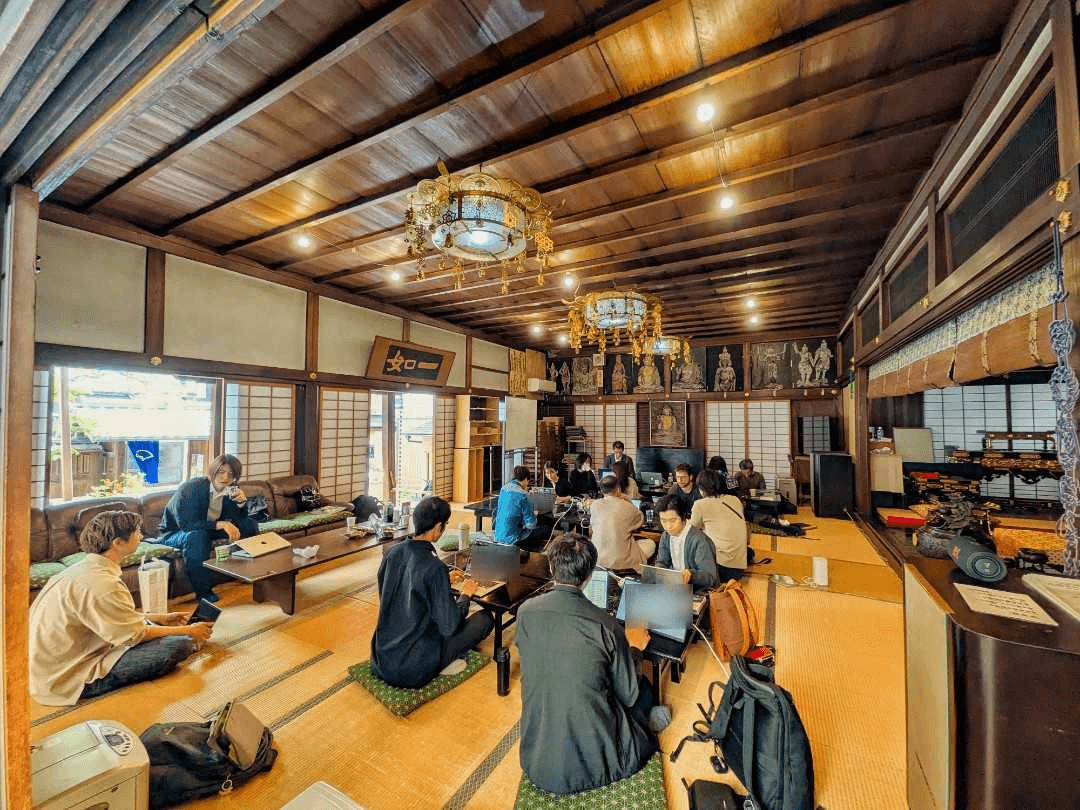
If the venue is a temple, a machiya, or anywhere else unfamiliar, include a photograph of the entrance. First-time attendees will not find it from an address alone.
STEP 4: Choose a venue you can keep using
Prioritize access, Wi-Fi and power, whether the space works with a small group, and whether the organizer can continue renting it without strain.
Power is the easiest thing to overlook. A co-working session runs for several hours, and without a socket per seat people start leaving in the second half. Bringing your own extension leads and power strips solves it.
Keep the venue fee to an amount you can absorb. If you depend on attendance fees to cover it, a thin turnout leaves the organiser out of pocket, and that is not sustainable. Public meeting rooms, co-working spaces, and company meeting rooms lent out are all candidates.
STEP 5: Recruit reliably rather than broadly
Trying to attract a large crowd for the first event is a mistake. 3–5 people are enough.
Announce in this order: invite people individually first, then post publicly. Reversing it publishes an event that nobody has registered for, which makes later visitors reluctant to be the first.
Approach former colleagues, people you have met at other study groups, or people you already talk to online. "I want to build this kind of space, so please come to the first one" works better than "I need to make up the numbers", and those people tend to return.
STEP 6: Continuity creates a community
Holding one event does not create a community. Set a manageable rhythm of about once per month.
Fix the day and the time. "The second Saturday afternoon" lets attendees hold the slot, and turns venue booking into routine work for you. Varying the date every time creates a scheduling negotiation before every announcement.
Decide the next date on the day itself and announce it. "Some time soon" becomes a gap, and a gap raises the cost of restarting.
What it costs to start
Creating a group, publishing events, and managing registrations on connpass are free. What you actually pay for is the venue, and food and drink if you provide them.
Using a public facility or a free space, and letting people bring their own refreshments, means you can start at no cost. Where a venue fee applies, either split it as an attendance fee or keep it within what you can cover yourself. You do not need sponsors at the start.
Common mistakes
- Trying to start too big
- Overdesigning the event
- Taking on everything alone
- Letting attendance numbers dictate every decision
All of these surface the same way: you stop being able to continue. The third is the most common. Handling venue booking, announcements, running the day, photography, and write-ups alone will exhaust you within a few sessions. Treat write-ups and photographs as work you are allowed to skip.
Attendance varies between sessions. Even after a thin turnout, not cancelling the next one is what keeps the group alive.
Conclusion
connpass makes the act of launching an IT community straightforward. Start small and continue; the community forms afterward.
Related links
Related articles
15 Active IT Engineer Communities to Join in 2026
A catalog of 15 communities for IT engineers—nine nationwide and six regional. Compiled from 7 years and 164 events of community operations in Kyoto, it covers choosing by learning, networking, speaking, or region; four steps to a first visit; and common questions. This is not an exhaustive nationwide list. The order is not a ranking, and each community's activity was checked against primary sources such as official sites and connpass.
In Kyoto, Making Something Together: The Connections We Hope to Nurture at Miyako de IT
What makes an IT community worth returning to? Miyako de IT founder Tomohiro Iida reflects on meeting people in Kyoto, following curiosity, and supporting small personal challenges.
How Corporate Sponsorship Supports IT Communities: Benefits and Process
More companies are sponsoring IT communities for recruiting branding and technical communications. Based on operating a Kyoto community of 647 members for 7 years and 164 events, this guide covers benefits, partnership options, process, and failure patterns.
Source data
The figures cited in this article are based on primary data in the Miyako de IT annual statistics report. It publishes yearly event counts, venue distribution, and event-format data.
Written by
Tomohiro Iida
Open event related to this article
 Waitlist
Oct 31 (Sat)
Original event title